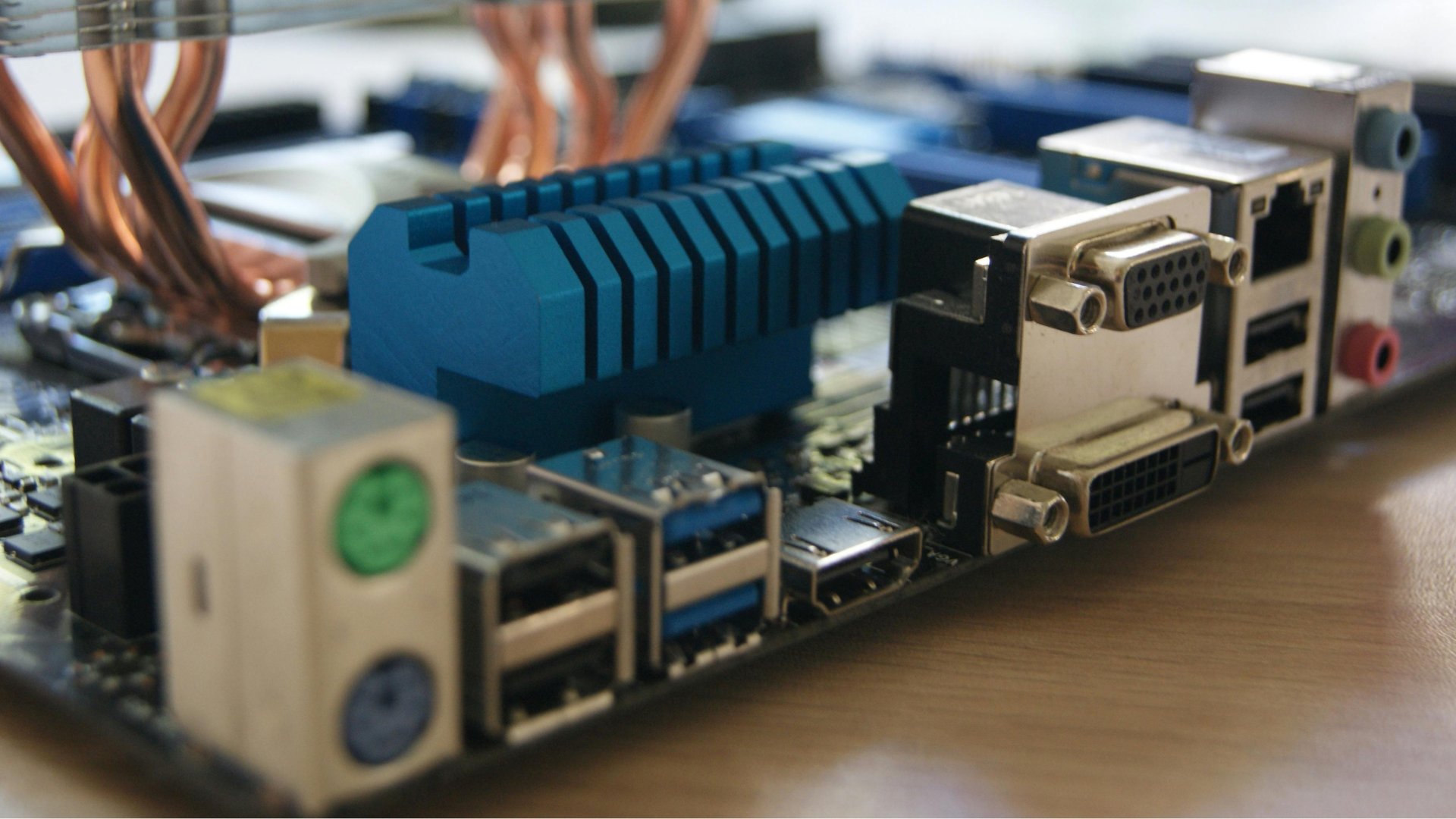
If you’ve ever looked at the back of a desktop or the side of a laptop and wondered what all those slots are for, the answer is that those are computer ports (also known as PC ports). Computer ports are a core part of how your system connects, communicates, and performs.
Below is a breakdown of what computer ports are, the different types of PC ports, and the use cases for each, so you can better understand your setup and make smarter decisions when upgrading or building a PC.
What Are PC Ports?
Computer ports are physical connection points on your device that allow it to communicate with external hardware. These ports let your computer send and receive data, output video and audio, connect to networks, and power accessories.
To keep it simple, ports are how your PC connects to everything outside it, including your monitor, keyboard, headset, internet connection, and more.
Physical vs. Logical Ports
One important point that’s worth noting is that not all ports are physical. There are also logical ports, which are used in software and networking to manage data communication (like TCP and UDP ports).
Typically, when people refer to “computer ports,” they mean the physical connectors on a device.
Why Computer Ports Matter
Understanding computer ports can directly impact your performance and experience.
Depending on how you’re using your PC, computer ports can affect what you’re doing in various ways:
Gaming: Using DisplayPort and Ethernet can improve visuals and reduce lag
Productivity: More USB ports allow for better multi-device workflows
Streaming and content creation: Stable connections reduce interruptions
Choosing the right computer ports for your needs and using them correctly makes all the difference in your system’s performance.
How Many Ports Are There in a Computer?
There’s no fixed number of ports on a computer, as the total depends on the device’s type and intended use. Gaming desktops typically have a wide range of PC ports to make it easier to boost performance and expand if needed. Laptops usually have fewer ports, so they rely on multi-function options like USB-C.
For the most part, there is a combination of:
Data ports (USB, Thunderbolt)
Display ports (HDMI, DisplayPort)
Network ports (Ethernet)
Audio ports (headphone and microphone jacks)

Types of Computer Ports
Understanding the different types of ports in a computer will help you connect the right devices and get the best performance from your system.
Types of Computer Ports #1: USB Ports
USB (Universal Serial Bus) ports are the most common ones found on modern computers. They connect to a wide variety of devices, including keyboards, mice, external drives, controllers, and more.
Some key features of USB ports include:
Supporting both data transfer and power delivery
Plug-and-play functionality
Availability in multiple versions (USB 2.0, USB 3.0, USB-C, USB4)
USB-C is the most versatile version, capable of handling data, video output, and charging through a single cable.
Types of Computer Ports #2: HDMI Ports
HDMI (High-Definition Multimedia Interface) ports transmit video and audio from your computer to an external display.
The most common uses of HDMI ports are:
Connecting monitors
Plugging into TVs
Gaming and streaming setups
HDMI is widely used because it combines audio and video into one simple connection.
Types of Computer Ports #3: DisplayPort
DisplayPort is another display interface found on gaming PCs and high-performance monitors.
These types of computer ports matter because they:
Support higher resolutions and refresh rates than many HDMI versions
Help with competitive gaming
Can handle audio, video, and multi-monitor setups
If you’re using a high-refresh-rate monitor, DisplayPort is often the better choice, especially if you want the highest resolution and fastest refresh rates.
Types of Computer Ports #4: Ethernet (RJ-45) Port
An Ethernet port allows your computer to connect directly to a network using a wired connection.
The benefits of Ethernet ports are:
They’re faster and more stable than Wi-Fi
They have lower latency for online gaming
They’re more reliable for streaming and large downloads
For gamers and streamers, Ethernet is typically the preferred option, especially for online gaming, where a stable connection makes all the difference.
Types of Computer Ports #5: Audio Ports (Headphone and Microphone Jacks)
Audio ports are for sound input and output, mainly for connecting headsets, speakers, and recording equipment. These PC ports are typically color-coded to signify which port is meant for which device.
Their typical configuration includes:
Green: Headphones or speakers
Pink: Microphone
Blue: Line-in
Types of Computer Ports #6: VGA, DVI, and Other Legacy Ports
Older display ports like VGA and DVI are less common today, but may still appear on older systems or monitors. VGA ports produce an analog signal and have lower image quality, while DVI is a digital signal that is better than VGA but is now outdated.
Most modern systems have replaced these with HDMI and DisplayPort, though adapters can still make them usable.
Types of Computer Ports #7: PS/2 Ports
PS/2 ports were once standard for connecting keyboards and mice. At this point, they’re rarely used in modern systems, but if you have older or more specialized hardware, you’ll likely find them.
Other Types of Computer Ports You Might See
Modern devices are increasingly moving toward fewer, more versatile ports, such as USB-C, that can handle multiple functions. However, some systems may have other types of PC ports on them still.
These additional computer ports includes:
SD Card Slot: Used for memory cards from cameras and other devices
Thunderbolt: High-speed port for data, video, and power (often uses USB-C)
USB Hubs: Expand a single USB port into multiple connections
Choosing the Right Ports for Your Setup
Computer ports are fundamental to your PC’s functionality. They determine how your system connects, communicates, and performs across everything from gaming to everyday tasks.
If you’re exploring new hardware, you can browse iBUYPOWER for gaming PCs or even build your own custom system to get the ports you need for your setup. Visit our deals page or our coupons page to find the latest discounts on all our products.
By understanding the different types of computer ports and their uses, you can better equip and optimize your setup, troubleshoot issues, and choose the right hardware for your needs.
To stay updated on all things iBUYPOWER, follow us on our socials
Instagram iBUYPOWER
Facebook iBUYPOWERPC
TikTok @iBUYPOWER
Reddit /r/iBUYPOWER
Discord iBUYPOWER