For gamers buying their first PC to those looking to upgrade their current setup, one of the most common questions on their minds is: how much does a gaming PC cost?
The answer isn’t one-size-fits-all. Gaming PCs can range in price from a few hundred dollars to several thousand. This price really depends on performance goals, components, and whether you choose a prebuilt system or build your own.
This guide provides an overview of component prices and how much they’ll add to the overall cost of building a gaming PC that fits your needs.
What Affects the Cost of a Gaming PC?
Before diving into price ranges, it’s important to understand the core variables that impact cost.
1. Graphics Card (GPU)
The GPU is the most important and often the most expensive component. It determines how well your system handles modern games, resolution (1080p vs 4K), and whether features like ray tracing will actually work.
2. Processor (CPU)
Your CPU affects overall system responsiveness and gaming performance, especially in CPU-intensive titles or competitive games.
3. RAM and Storage
Storing your game files is crucial for enjoying your games to the fullest. For most gaming PCs, 16 GB of RAM is standard, with many higher-end builds boasting 32 GB. You can add more storage with an SSD to improve the game’s load times, but this is an extra cost that can drive up the price.
4. Cooling and Case Design
Good airflow is necessary to prevent your gaming PC from overheating, and your PC case can play a major role in ensuring it stays cool. However, better airflow, RGB lighting, and premium cases increase the price but improve thermals and aesthetics.
5. Prebuilt vs. Custom Build
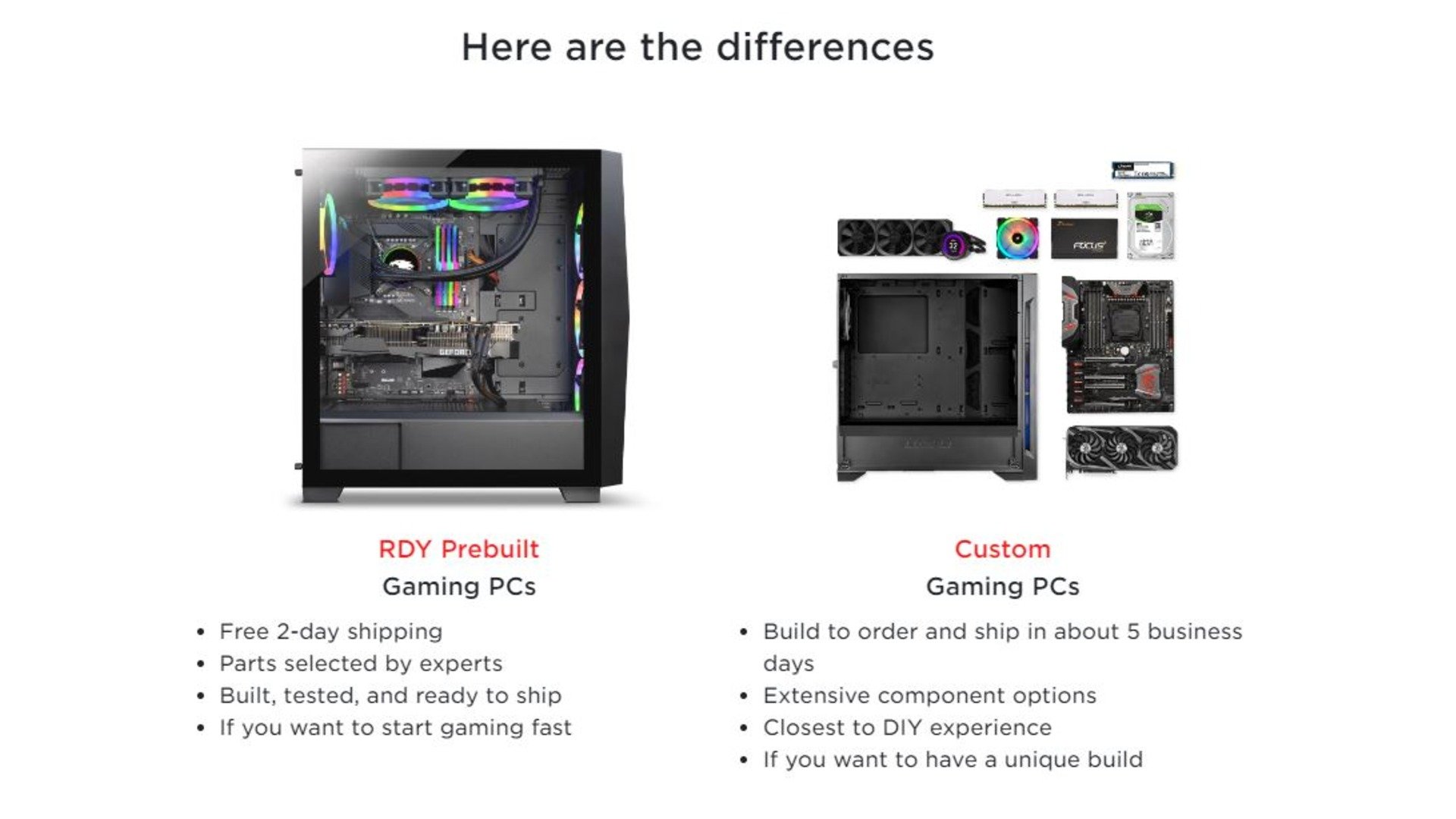
Choosing between building your own PC and buying a prebuilt one will also affect the cost. With prebuilt gaming PCs, you are paying for the convenience of having it already put together, which typically includes the cost of labor, warranty, and technical support. Custom builds may be cheaper, but require more time and technical knowledge to create a PC that functions properly.
Budget Gaming PCs
If you’re wondering how much is a gaming PC and monitor cost at the low end, most entry-level setups fall into this category. Budget gaming PCs usually handle 1080p gaming at medium to high settings, making them a solid choice for casual players or for less demanding titles.
Older games and popular esports titles typically run smoothly, though these systems may have limited future-proofing as newer, more demanding games are released. In terms of hardware, you can expect an entry-level GPU paired with a mid-tier CPU, along with 8GB to 16GB of RAM and a 500GB to 1TB SSD for storage, providing a balanced foundation for getting started in PC gaming.
Estimated Total Budget PC Cost:
PC: $500–$1,000
Monitor + peripherals: $150–$400
Total setup cost: ~$650–$1,400
Mid-Range Gaming PCs
This tier is widely considered the sweet spot for most gamers and best represents how much a good gaming PC costs today. Mid-range systems can deliver 1080p gameplay at ultra settings or 1440p at high settings, providing smooth performance across modern AAA titles. They also offer improved multitasking capabilities for streaming or content creation.
For hardware, these builds typically include a mid-range GPU, a strong multi-core CPU, 16GB to 32GB of RAM, and a fast 1TB SSD (often an NVMe drive for quicker load times). This level of performance is a good fit for serious gamers, streamers, and anyone who wants to balance power, longevity, and value.
Estimated Total Mid-Range Gaming PC Cost:
PC: $1,000–$2,000
Monitor + peripherals: $300–$700
Total setup cost: ~$1,300–$2,700
High-End Gaming PCs
If you want to know how much does a high-end gaming PC cost, this is where premium performance truly stands out. High-end gaming PCs are built to handle 1440p ultra settings or full 4K gaming with ease, often featuring ray tracing and AI-enhanced graphics for a more immersive experience. These systems also support high-refresh-rate gaming, typically ranging from 144Hz to 240Hz or higher.
In terms of hardware, you can expect a high-end GPU paired with a top-tier CPU, along with 32GB or more of RAM, multiple SSDs or high-capacity NVMe drives, and advanced cooling solutions, such as liquid cooling. Most gamers aiming for this level of performance are enthusiasts, competitive gamers, and streamers, along with anyone seeking the absolute best available performance.
Estimated Total Cost:
PC: $2,000–$4,000+
Monitor + peripherals: $500–$1,500
Total setup cost: ~$2,500–$5,500+
How Much Is a Prebuilt Gaming PC?
Although many gamers prefer to build their own gaming PCs to customize their setups, others prioritize convenience. If you want a plug-and-play setup that lets you start playing right out of the box, a prebuilt gaming PC might be the better option.
Compared to a PC build, a prebuilt gaming PC typically costs a little more because someone else assembles and tests it for you. Aside from that, many prebuilt PCs also come with a warranty and technical support, making it easier to keep the PC in the best shape possible.
Despite all the great aspects of a prebuilt PC, you will pay a premium compared to sourcing parts individually, which is something to keep in mind when budgeting. In the end, though, you do save time and avoid compatibility issues.
The Extra Costs of a Gaming PC
When calculating how much is the cost of a gaming PC and monitor, it’s important not to overlook additional costs beyond the system itself.
Monitors: 1080p displays ($100 to $250), 1440p monitors ($250 to $500), and 4K options ($400 to $1,000+).
Keyboard: $50 to $200
Mouse: $30 to $150
Headset: $50 to $200
Windows license: $100 (if not already included on the PC).
Beyond that, your setup may require a reliable internet connection with a gaming router or Ethernet configuration, as well as accessories like a desk, chair, and proper lighting. Altogether, these additional expenses can add several hundred dollars, or even thousands, to your overall gaming setup.
How Much Does a Good Gaming PC Cost?
So, how much does a gaming PC cost? It depends entirely on your goals and whether you choose to build your own PC or buy a prebuilt one.
Some other factors you might want to consider are:
What Games You Play: Esports titles can typically run on budget builds, but AAA games run their best with mid-range or higher-end PCs.
Resolution and Performance Goals: If you’re a casual gamer, you can probably get away with a lower-cost, 1080p PC, while competitive gamers might want 1440p or 4K.
Longevity: Spending more upfront often means fewer upgrades later.
Multi-Use Needs: If you want to do any streaming, editing, or productivity tasks, you need stronger hardware.
Ultimately, the best gaming PC isn’t the most expensive. It’s the one that fits your gaming style, performance expectations, and budget. By understanding where your needs fall, you can confidently invest in a setup that delivers the experience you’re looking for.
Looking to upgrade your PC? Check out iBUYPOWER’s selection of gaming PCs and custom build options to get the best gaming PC for your favorite games. Visit our deals page or our coupons page for the latest discounts on all our products. While we don’t offer an ibuypower cashback program, you can still redeem your rewards points for extra savings at checkout.
To stay updated on all things iBUYPOWER, follow us on our socials
Instagram iBUYPOWER
Facebook iBUYPOWERPC
TikTok @iBUYPOWER
Reddit /r/iBUYPOWER
Discord iBUYPOWER